WORK LIFE
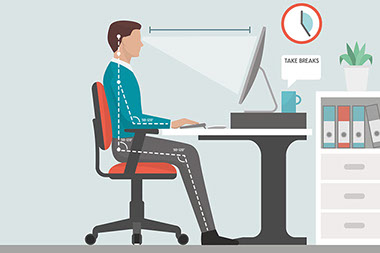
Many people sit at a computer as part of their daily job. If a chair, desk or workstation isn’t working for you, it can cause sore muscles and joints and even an injury. To stay safe and healthy at the computer, follow these ergonomics guidelines.
Remember to get up and move whenever possible! A walk during your lunch break, taking the stairs or doing stretches at your desk can help you feel energized and burn a few extra calories. Look for ways to get your body moving, even if it’s only for five to 10 minutes. A little exercise is better than none at all.
Monitor:Monitor should be at eye level or slightly below. Monitor to eye distance: 20 to 40 inches
Arms:Armrests should allow shoulders to relax. Elbows should be close to the body. Minimal bend at the wrist.
Chair:Backrest should conform to the spine. Chair should have lumbar (lower back) support.
Legs:Thighs parallel to the floor.
Feet:Feet should be flat on the floor. Use a footrest if needed.
Take breaks:Every 20-25 minutes
Source: Occupational Safety and Health Administration

© American Institute for Preventive Medicine