Tag: desk

  • Working In Exercise While At Work

    Fitness

    Move more, even when you sit.

    Chances are you don’t have one of those newfangled treadmill desks in your office. That shouldn’t stop you from adding exercise into your work schedule. If you get breaks, use them to march up and down the stairs or walk around the building a few times. Or, go into an empty conference room and pound out some pushups. While you probably won’t get enough of a workout for one day’s needs, short stints of exercise add up.

    Don’t just stand there.

    Waiting for the coffee to brew? Burst into a 60-second aerobic routine that includes side stepping or marching in place. Or, squat and stand as the copy machine spits out your papers. And, perhaps just to freak out co-workers, strike a warrior pose in the break room. See if you can hold it for a minute without talking (or laughing).

    Do sitting-down-on-the-job exercises.

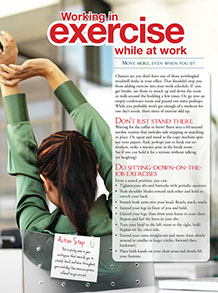
    Women sitting at desk, stretching arms above her head.

    From a seated position, you can:

    *  Tighten your abs and buttocks with periodic squeezes.

    *  Push shoulder blades toward each other and hold to stretch your back.

    *  Stretch both arms over your head. Reach, reach, reach.

    *  Extend your legs in front of you and hold.

    *  Extend your legs, than draw your knees to your chest. Repeat and feel the burn in your abs.

    *  Turn your head to the left, torso to the right, hold. Repeat on the other side.

    *  Extend your arms straight out and move them slowly around in smaller to larger circles, forward then backward.

    *  Place both hands on your chair arms and slowly lift your bottom.

    Action Step

    Put a sticky note in your workspace that reminds you to stretch, bend, and move throughout your workday. Use exercise options offered to you at work.
    Page image from Ways to Well-Being book by the American Institute for Preventive Medicine. www.HealthyLife.com. All rights reserved.

    © American Institute for Preventive Medicine
  • Workstation Exercises

    Work Life

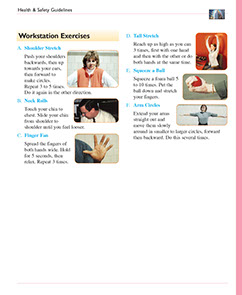
    Shoulder Stretch

    Push your shoulders backwards, then up towards your ears, then forward to make circles. Repeat 3 to 5 times. Do it again in the other direction.

    Neck Rolls

    Touch your chin to chest. Slide your chin from shoulder to shoulder until you feel looser.

    Finger Fan

    Spread the fingers of both hands wide. Hold for 5 seconds, then relax. Repeat 3 times.

    Tall Stretch

    Reach up as high as you can 3 times, first with one hand and then with the other or do both hands at the same time.

    Squeeze a Ball

    Squeeze a foam ball 5 to 10 times. Put the ball down and stretch your fingers.

    Arm Circles

    Extend your arms straight out and move them slowly around in smaller to larger circles, forward then backward. Do this several times.

    Healthier at Home book by the American Institute for Preventive Medicine. www.HealthyLife.com. All rights reserved.

    © American Institute for Preventive Medicine

  • Is Your Job A Pain In The Neck?

    WORK LIFE

    Image of business man holding his neck.

    No, really, if you sit all day in front of a computer at work, your computer workstation may be the cause of your nagging neck and shoulder pain. And not surprising, said Dr. Vincent Fortanasce, a rehab specialist and author of End Back & Neck Pain, “The setup of your computer workstation can play a large factor in your ability to stay symptom free.” He and his coauthors point out 3 common workstation mistakes people make that lead to pain.

    *  Overreaching injuries occur because items on your desktop such as your keyboard or mouse, phone, documents, and other desk items are not on the same level surface. So you reach to grab that stapler or strain to pick up files.The solution: rearrange the desktop, adjust your chair, put the keyboard and mouse on the same surface, put things you use the most closest to you.

    *  Use of incorrect heights refers to the up and down motions and placement of items. Incorrect height occurs as a result of the positioning of the chair, including the armrests, seat back, seat pan, desktop where work is placed, monitor, and the surface holding the keyboard and mouse. Incorrect height may also refer to furniture and features of the work area that are not adjustable.The solution: a proper chair is of critical importance. Can you adjust it? Do you have to reach above your head to get items in shelves above your desk? Is the top line of the text displayed on your monitor at eye level?

    * Unbalanced work area refers to twisting motion you do to reach items. If you’re right handed, and you use your right hand for all desktop activities such as answering the phone, you may have pain on your right side. Do you twist to see your monitor?The solution: Place your monitor right in front of you. Are items you use directly ahead of you?

    Back, neck, and arm pain are often the result of repeated actions, over and over, over time. Assess what’s causing your pain and adjust your workstation.

    © American Institute for Preventive Medicine

  • Stretching Exercises To Do At Your Desk

    WORK LIFE

    Image of office with employees working on computers.

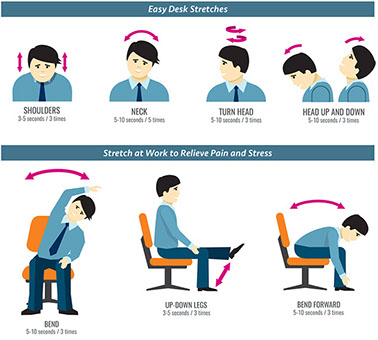
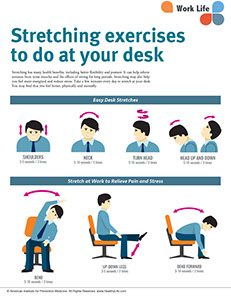
    Stretching has many health benefits, including better flexibility and posture. It can help relieve soreness from tense muscles and the effects of sitting for long periods. Stretching may also help you feel more energized and reduce stress. Take a few minutes every day to stretch at your desk. You may find that you feel better, physically and mentally.

    Illustration showing different desk stretches.

    © American Institute for Preventive Medicine