Tag: lighting

  • Ergonomics For The Home Office

    WORK LIFE

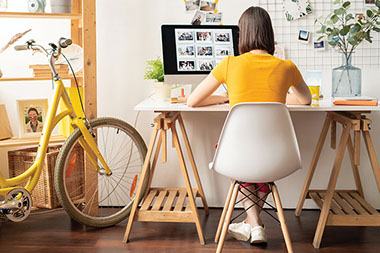
    Women sitting at desk working on computer.

    If you are working from home, either full or part-time, you should ensure your home office is set up ergonomically. A set-up that is not designed for efficiency and comfort can lead to wasted time and poor posture.

    Do a quick assessment of your work space and see if it meets ergonomic standards.

    Things to check when seated at your desk:

    *  Are your head and neck balanced and in line with your spine?

    *  Can you sit upright in your chair with your lower back fully supported?

    *  Are your shoulders relaxed and forearms parallel to the floor?

    *  Are your wrists straight when using the mouse or keyboard?

    *  Is your monitor an arm’s length away and in direct line of sight?

    Home office considerations:

    *  Are you working in a comfortable location?

    *  Can you alternate between sitting and standing?

    *  Do you move regularly to stretch and change position?

    *  Are your most used items within easy reach?
    © American Institute for Preventive Medicine
  • Burglarproof Your Home

    Home Safety

    Don’t be an easy target for thieves.

    Most home burglaries are the work of amateurs who are looking for a quick in and out. Make it look like someone is at home, especially while you are away.

    Dos:

    *  Inspect all locks on exterior doors. If they can be opened with a screwdriver or a credit card, replace them with single cylinder deadbolt locks.

    *  Install outside lighting with motion sensors around the house and garage.

    *  Consider installing an alarm system. Make sure the sign for it can be easily seen from the street.

    *  Close and lock windows. Put a metal or wooden rod between windows and frames, especially in door walls.

    *  Keep shrubs in front of windows no higher than three feet tall. This makes it hard for a burglar to hide in them.

    *  Engrave a personal contact code on your TV and other valuables to make them harder to sell and easier to trace.

    *  Join or start a neighborhood watch group.

    If your home will be vacant for several days or longer:

    *  Ask a relative or a neighbor you trust to watch your house. Consider leaving a key with one of them and ask them to do a periodic walk-through.

    *  Put a stop on delivery of mail and newspapers.

    *  Arrange for someone to mow the lawn or clear snow from the driveway and sidewalk. Ask a neighbor to park in your driveway.

    *  Preset automatic light timers to keep the house   well-lit during the evening and make it look like someone is home.

    *  Keep a radio on while you are gone. Set it to a 24-hour news or talk station.

    *  Find out if your local police department keeps a “vacant house list.” This alerts police to drive by and check on your house if you are gone for a week or longer.

    Action Step

    Store valuable items in places not easily seen. As an extra preventive measure, put valuable jewelry in a bank safety deposit box.

    Ways to Well-Being book by the American Institute for Preventive Medicine. www.HealthyLife.com. All rights reserved.

    © American Institute for Preventive Medicine

  • Avoiding Digital Eye Strain

    WORK LIFE

    Image of man working on computer.

    Many people spend a lot of time in front of a computer screen at their job. And when we’re not at our desks, we may be looking at a smartphone or tablet or watching TV. All of these digital screens add up to a lot of strain on the eyes. Viewing a digital screen is hard on the eyes due to glare and reflections. Most screens also have less defined letters than printed paper, making them harder to read.

    Digital eye strain, or computer vision syndrome, may cause dry eyes or blurred vision, but it can affect other areas of the body as well. Some people also experience headaches and neck and shoulder pain. If these symptoms bother you when you’re using a digital screen, you may have digital eye strain.

    When you are viewing a screen for long periods, protect your eyes from strain by following these tips:

    *  Keep your screen about four to five inches below eye level.

    *  Avoid glare by moving the screen away from windows and bright lights. Consider a screen glare filter if needed.

    *  Rest your eyes throughout the day with the 20-20-20 rule. Every 20 minutes, look at an object 20 feet away for 20 seconds.

    *  Think about blinking. Many people blink less frequently while viewing a screen. Be intentional about blinking so your eyes stay moist.

    *  Get regular eye exams from a qualified doctor or optometrist. Be sure to tell your doctor if you notice any symptoms of digital eye strain or vision changes.

    Source: American Optometric Association

    © American Institute for Preventive Medicine

  • Eye-Popping Facts

    WELL-BEING

    Image of 2 young brothers using a tablet at bedtime.

    Kids (and adults) are spending hours using electronics such as iPads, video games, computers, and smartphones. How much is too much for your eyes when it comes to digital device use?

    Eye strain or Computer Vision Syndrome (CVS) is a serious condition that can cause back and neck pain, dry eye, and even headaches. Statistics show that 80% of what we learn is through our eyes, which means that digital eyestrain and CVS can have a major impact on productivity and success.

    VSP optometrist, Dr. Nate Bonilla-Warford suggests these eye-easing ways to avoid digital eye strain:

    *Blink often:When looking at a computer or hand-held digital device, it’s common for you to blink 2 to 3 times less than you normally would. This can lead to “dry eye.” Blinking bathes your eyes in tears, and tears are naturally helpful for the eyes.

    *Follow the 20/20/20 rule:When spending long periods in front of a digital device, every 20 minutes, spend 20 seconds looking at something 20 feet away to allow your eyes to rest.

    *Ensure proper lighting:Poor lighting often causes eye strain. To help ease the strain on your eyes, keep bright lighting overhead to a minimum and position your desk lamp to shine on your desk, and not at you.

    *Wear it:If you or your child wears prescription glasses-for digital use or otherwise-make sure to have them on.

    © American Institute for Preventive Medicine