Tag: ergonomics

  • Ergonomics For The Home Office

    WORK LIFE

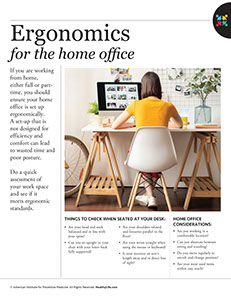
    Women sitting at desk working on computer.

    If you are working from home, either full or part-time, you should ensure your home office is set up ergonomically. A set-up that is not designed for efficiency and comfort can lead to wasted time and poor posture.

    Do a quick assessment of your work space and see if it meets ergonomic standards.

    Things to check when seated at your desk:

    *  Are your head and neck balanced and in line with your spine?

    *  Can you sit upright in your chair with your lower back fully supported?

    *  Are your shoulders relaxed and forearms parallel to the floor?

    *  Are your wrists straight when using the mouse or keyboard?

    *  Is your monitor an arm’s length away and in direct line of sight?

    Home office considerations:

    *  Are you working in a comfortable location?

    *  Can you alternate between sitting and standing?

    *  Do you move regularly to stretch and change position?

    *  Are your most used items within easy reach?

    © American Institute for Preventive Medicine

  • Prevent Injuries

    Work Life

    Most workplace injuries can be prevented. What you need to do depends on the job you do and the hazards you are exposed to. Your place of work may have certain standards and safety measures. Some are set by the Occupational Safety and Health Administration (OSHA). Know and follow your workplace’s safety rules. Ask questions if you don’t understand them.

    General Safety Tips

    *  Help prevent slip and falls.

    – Keep walk areas free from clutter. Secure telephone and electrical cords to prevent tripping.

    – Wear nonskid shoes or footwear with a tread pattern to prevent slips, if needed.

    – Keep walking surfaces dry and free of water, grease, etc.

    – Use proper lighting. Look where you are going. Don’t carry things that block your vision.

    – Don’t lean back in your chair.

    – Don’t climb on chairs or boxes. Use a ladder that lets you safely reach items.

    *  Don’t pile items on stairs or against doors.

    *  Report injuries and “near misses” of injuries to your supervisor or to security. Follow your company’s rules for this.

    Safety for High Risk Occupations

    Certain jobs may require workers to:

    *  Use Material Safety Data Sheets (MSDSs). These tell you how to use chemicals safely. They can be on printed pages and in a computer. Know where this data is. Use the information given.

    *  Wear protective headgear (e.g., hard hats, hair covers, etc.).

    *  Wear safety glasses with side shields, goggles, face shields, tinted glasses to reduce glare, etc. Keep eyewear clean and in good condition. Replace it if it is broken or has a defect.

    *  Wear ear plugs or special ear muffs. These protect hearing from damage.

    *  Wear steel-toe shoes or boots.

    *  Protect your lungs from dust, fumes, gases, vapors, etc. If needed, use the right type of mask or respirator for the material you are working with. Not all masks filter all particles or gases. Have your respirator “fit tested” to assure safe use.

    Healthier at Home book by the American Institute for Preventive Medicine. www.HealthyLife.com. All rights reserved.

    © American Institute for Preventive Medicine

  • Repetitive Motion Injuries

    Bone & Muscle Problems

    Repetitive motion injuries (RMIs) are also called repetitive strain injuries (RSIs). They result from doing the same activity over and over for a long period of time. This can be at work, at home, during sports, and/or with hobbies.

    Signs & Symptoms

    Signs and symptoms depend on the injury.

    For Carpal Tunnel Syndrome (CTS)

    *  Thumb, index, middle, and ring fingers feel numb.

    *  Tingling feeling in the hand(s).

    *  Pain is felt in the thumb and fingers. The pain may be worse at night. It can wake you up.

    *  Pain starts in the hand and spreads to the arm. The pain can even travel to the shoulder.

    *  The fingers swell. It feels like your fingers are swollen. Your hands feel weak in the morning.

    *  You have trouble holding on to things. You drop things.

    *  You have a hard time writing with a pencil or pen, opening a jar, buttoning a blouse, etc.

    Causes

    In general, RMIs are caused by repeated movements that involve:

    *  Drilling or hammering.

    *  Lifting.

    *  Pushing or pulling.

    *  Squeezing.

    *  Twisting.

    *  Wrist, finger, and hand movements.

    For Carpal Tunnel Syndrome (CTS)

    Repeated motions, typing vibrations, etc. cause swelling of the tendons inside the carpal tunnel. This is the narrow tunnel in the wrist. The swelling puts pressure on the nearby nerves.

    Treatment

    For Carpal Tunnel Syndrome (CTS)

    This is easier to treat and less likely to cause future problems if it is found early. Women are more likely to get CTS than men, because their carpal tunnel is usually smaller. Once diagnosed, CTS can be treated with:

    *  Preventing further damage.

    *  Wearing a wrist brace, splint, etc. as advised. It may need to be worn while you sleep and during the day.

    *  Over-the- counter medicines to reduce pain and swelling. Examples are aspirin, ibuprofen, and naproxen sodium.

    *  Physical therapy.

    *  Occupational therapy.

    *  Cortisone shots in the wrist area.

    *  Surgery, if needed.

    Questions to Ask

    Self-Care / Prevention

    For Preventing Wrist and Hand Injuries

    Whenever your hands and wrists do the same activity time and again, you increase your risk for CTS and tendinitis. Change how you do a task and you may avoid some of these injuries.

    *  Do not hold an object in the same position for a long time. Even simple tasks, such as hammering nails, can cause injury when done over a period of time.

    *  Give your hands a break. Rest them for a few minutes each hour.

    *  Lift objects with your whole hand or with both hands. Gripping or lifting with the thumb and index finger puts stress on your wrist.

    *  If your line of work causes pain in your hands and wrists, alternate the stressful tasks with other work.

    *  Exercise your hands and wrists as often as you can. Here are two examples:

    – Place your hands in front of you. Spread your fingers as far apart as possible. Hold for 5 seconds. Relax. Repeat 5 times with each hand.

    – Turn your wrists in a circle, palms up and then palms down. Relax your fingers and keep your elbows still. Repeat 5 times.

    For Carpal Tunnel Syndrome

    *  Lose weight. CTS is linked to obesity.

    *  Take an over-the-counter medicine to reduce the pain and swelling as directed.

    *  Use a wrist splint. Many drug and medical supply stores carry splints that keep the wrist angled slightly back with the thumb parallel to the forearm. This position helps to keep the carpal tunnel open.

    Other Tips

    *  Keep your head upright and your ears, shoulders, and hips in a straight line.

    *  Keep your work within reach without having to stretch or strain your arms, shoulders, or back. Don’t stretch to reach items on an assembly line. Wait for the items to reach you.

    *  Change positions or tasks often. This avoids repeated stress on a single body part.

    *  Use the proper tools for the job. Use tools made to reduce vibration and/or pressure, if needed.

    Resources

    National Institute of Arthritis and Musculoskeletal and Skin Diseases (NIAMS)

    877.22.NIAMS (226.4267)

    www.niams.nih.gov

    Healthier at Home book by the American Institute for Preventive Medicine. www.HealthyLife.com. All rights reserved.

    © American Institute for Preventive Medicine

  • Avoid The Aches And Pains Of Technology

    SELF-CARE CORNER

    Image of business man with laptop and smart phone.

    You can prevent BlackBerry thumb and text neck-new ailments that came with devices such as smartphones and BlackBerries and their small keyboards, advises the American Chiropractic Association.

    *  Avoid typing for more than 3 minutes without a break.

    *  Keep messages short and simple; abbreviate.

    *  Practice using other fingers for typing, especially when thumbs hurt.

    *  Don’t slouch when texting.

    *  Keep wrists upright, straight and close to the body when holding a device.

    *  Don’t bend your neck excessively when texting; tuck your chin in instead and look down.

    *  Turn your devices off on the weekends (or at least on Sunday).

    *  Get outside, exercise and enjoy nature too. Balance is key to staying healthy.

    For more tips on proper use of technology and good health, visitwww.TechnoHealthy.com.

    © American Institute for Preventive Medicine

  • Is Your Job A Pain In The Neck?

    WORK LIFE

    Image of business man holding his neck.

    No, really, if you sit all day in front of a computer at work, your computer workstation may be the cause of your nagging neck and shoulder pain. And not surprising, said Dr. Vincent Fortanasce, a rehab specialist and author of End Back & Neck Pain, “The setup of your computer workstation can play a large factor in your ability to stay symptom free.” He and his coauthors point out 3 common workstation mistakes people make that lead to pain.

    *  Overreaching injuries occur because items on your desktop such as your keyboard or mouse, phone, documents, and other desk items are not on the same level surface. So you reach to grab that stapler or strain to pick up files.The solution: rearrange the desktop, adjust your chair, put the keyboard and mouse on the same surface, put things you use the most closest to you.

    *  Use of incorrect heights refers to the up and down motions and placement of items. Incorrect height occurs as a result of the positioning of the chair, including the armrests, seat back, seat pan, desktop where work is placed, monitor, and the surface holding the keyboard and mouse. Incorrect height may also refer to furniture and features of the work area that are not adjustable.The solution: a proper chair is of critical importance. Can you adjust it? Do you have to reach above your head to get items in shelves above your desk? Is the top line of the text displayed on your monitor at eye level?

    * Unbalanced work area refers to twisting motion you do to reach items. If you’re right handed, and you use your right hand for all desktop activities such as answering the phone, you may have pain on your right side. Do you twist to see your monitor?The solution: Place your monitor right in front of you. Are items you use directly ahead of you?

    Back, neck, and arm pain are often the result of repeated actions, over and over, over time. Assess what’s causing your pain and adjust your workstation.

    © American Institute for Preventive Medicine